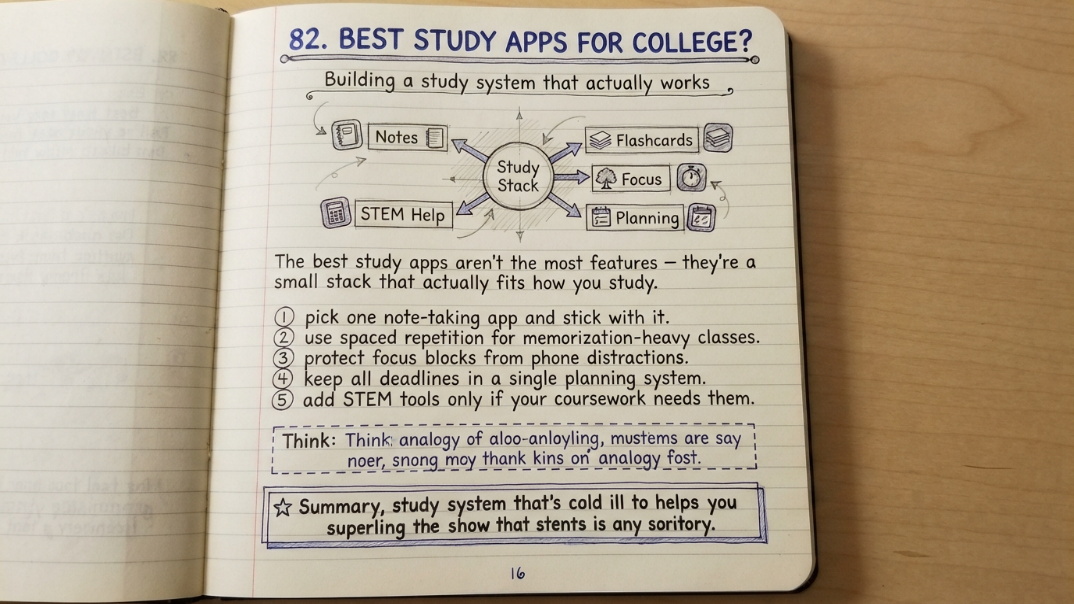
College students juggle more competing demands on their attention than almost any other stage of life — lectures, deadlines, part-time jobs, and a social life, all fighting for the same limited hours. Study apps promise to help, but most students end up with a phone full of tools they barely use, adding notification noise instead of removing friction. The best study apps for college students aren't the ones with the most features; they're the small set that actually fits how a specific student studies. This guide breaks down the categories that matter, the apps most consistently recommended in each one, and how to put together a stack that works instead of one that just sits on your home screen.
Why Most Students Have Too Many Study Apps
Most students accumulate study apps the same way they accumulate browser tabs — one at a time, in response to a specific deadline, without ever pruning the ones that didn't stick. The result is a phone full of half-used flashcard apps, abandoned planners, and note-taking tools with three weeks of notes and then nothing. The fix isn't finding one more app; it's picking a small, deliberate set that covers the handful of things that actually move the needle on a college workload, and dropping everything else.
The Five Categories That Actually Matter
Nearly every study app on the market falls into one of five functional categories, and a good student stack usually needs no more than one or two apps per category. Trying to cover all five with a single all-in-one app rarely works as well as picking the strongest tool for each specific job.
- Note-taking — capturing and organizing lecture and reading notes in one place
- Flashcards and spaced repetition — building long-term memory for facts, terms, and formulas
- Focus and time management — protecting study blocks from distraction
- Planning and task management — tracking deadlines, assignments, and exam dates
- STEM problem-solving — working through math and science problems step by step
Best Apps for Note-Taking
Notion remains one of the most widely recommended note-taking tools for college students because it doubles as a flexible workspace — class notes, reading summaries, and to-do checklists can all live in one linked system rather than scattered across separate apps. It's free for students, with a paid Plus tier for heavier use. For students who prefer handwritten notes on a tablet, apps built around digital note pages and PDF annotation are a strong alternative, especially for STEM courses with diagrams and equations. The right choice mostly comes down to whether a student thinks in typed, linked documents or handwritten pages.
Best Apps for Flashcards and Spaced Repetition
Anki is widely considered the gold standard for spaced repetition, since it schedules review of each card based on how well a student already knows it, surfacing difficult material more often and easy material less. It's free on desktop and Android, with a one-time paid app on iOS, and it's especially well-suited to memorization-heavy fields like medicine, language learning, or anatomy. Quizlet is the more accessible option for students who want to get started quickly, largely because of its enormous library of user-created flashcard sets — there's a good chance someone has already built a deck for a popular course. Quizlet has a free tier with ads and a paid Plus tier around $8 a month that removes ads and adds AI-assisted study features.
Best Apps for Focus and Time Management
Forest is one of the most consistently recommended focus apps among college students, using a simple mechanic — a virtual tree grows while you stay off your phone, and wilts if you leave the app — to turn avoiding distraction into something with immediate visual feedback. It's a low-effort way to build Pomodoro-style study blocks without needing to configure much. For students who want more detailed session tracking and analytics on where their time actually goes, dedicated Pomodoro timer apps with built-in session logs are a useful complement, especially heading into exam weeks when time awareness matters more.
Best Apps for Planning and Task Management
Todoist is a frequently recommended task manager for students because it strikes a workable balance between simplicity and structure — recurring tasks, due dates, and project grouping without the overhead of a full project-management tool. For students who prefer to see their semester visually, a shared calendar app (Google Calendar or similar) blocked out by class, assignment due dates, and study sessions often works just as well, particularly when paired with a lighter task list for daily to-dos rather than a heavier planning app.
Best Apps for STEM Problem-Solving
Wolfram Alpha is a long-standing favorite for STEM coursework because it doesn't just return an answer — it can show the computational steps behind it, which makes it useful for checking work rather than just copying a result. Photomath serves a similar purpose specifically for handwritten or photographed math problems, scanning an equation and walking through the solution step by step, which makes it particularly useful for algebra, calculus, and similar coursework. Desmos, a graphing calculator app, is widely used alongside both for visualizing functions and checking graphical work.
Free vs Paid: What's Actually Worth Paying For
Most of the apps on this list have strong free tiers, and a student can build a fully functional study stack without paying for anything. The paid upgrades tend to be worth it selectively rather than across the board — Quizlet Plus's ad removal and AI study paths are a reasonable upgrade for students who use flashcards daily, while Notion Plus mostly matters for students managing unusually large note systems or working in groups. A useful rule of thumb: only pay for a feature you've already confirmed you'd use in the free tier, rather than upgrading in the hope that more features will fix a habit problem.
| Category | Free Option | Typical Paid Upgrade |
|---|---|---|
| Notes | Notion (free for students) | Notion Plus, ~$10/month |
| Flashcards | Anki (free desktop/Android), Quizlet free tier | Anki one-time iOS fee (~$25); Quizlet Plus, ~$8/month |
| Focus | Forest free tier | Forest premium features, one-time low-cost purchase |
| Planning | Todoist free tier, Google Calendar | Todoist Pro, monthly subscription |
How to Build Your Own Study App Stack
The most effective student stacks are small and specific to how a person actually studies, rather than an attempt to install every recommended app at once.
- Pick one note-taking app and commit to it for a full semester before switching
- Add a spaced-repetition or flashcard app only for courses with heavy memorization, not every class
- Use a single focus app during dedicated study blocks rather than several overlapping ones
- Keep planning in one place — either a task app or a calendar, not both duplicated
- Add a STEM problem-solving app only if your coursework actually requires it
Common Mistakes Students Make With Study Apps
A few patterns show up again and again among students whose app stack doesn't actually improve their studying.
- Downloading a new app for every new problem instead of using what's already installed
- Spending more time formatting notes or building flashcards than actually reviewing them
- Treating an app subscription as a substitute for an actual study habit
- Using multiple planning apps at once, which splits deadlines across systems and increases the odds of missing one
- Abandoning an app after a few days instead of giving a new habit a full week or two to stick
FAQs
What are the best free study apps for college students?
Notion for notes, Anki for spaced-repetition flashcards, Forest for focus, and Todoist or Google Calendar for planning all offer strong free tiers that cover most of what a college student needs without any paid upgrade.
Is Quizlet or Anki better for college students?
Quizlet is generally easier to get started with and has a large library of pre-made flashcard sets, while Anki's spaced-repetition scheduling is more effective for long-term retention, especially in memorization-heavy fields like medicine or language learning.
Do I need a different app for every class?
No. Most students do best with one note-taking app, one flashcard app used selectively for memorization-heavy courses, one focus app, and one planning system, rather than a different tool per class.
What's the best app for staying focused while studying?
Forest is one of the most widely used focus apps among college students, using a simple visual mechanic to discourage phone use during study sessions, and pairs well with a basic Pomodoro-style timer.
Are paid study apps worth it for college students?
Only selectively. Most core functionality is available for free, and paid upgrades are generally worth it only for features a student has already confirmed they'd use regularly, such as heavy daily flashcard use or large linked note systems.
What's the best app for math and science homework?
Wolfram Alpha and Photomath are the most commonly recommended tools for STEM coursework, since both can show step-by-step solutions rather than just a final answer, which makes them useful for checking work.