How I Use Claude to Build Frontend UIs
Claude frontend skills are instruction files that stop Claude Code from making generic-looking websites, and this guide shows you exactly how to install and use them.
Key Takeaways
- Claude frontend skills are instruction files (usually a SKILL.md file) that teach Claude Code how to design a website properly, instead of making it guess.
- Anthropic has its own official skill called "Frontend Design," and it's free to install from Anthropic's own plugin marketplace.
- Superpowers is a different, community-built skill set made by a developer named Jesse Vincent — it's not about design, it's about writing correct, tested code.
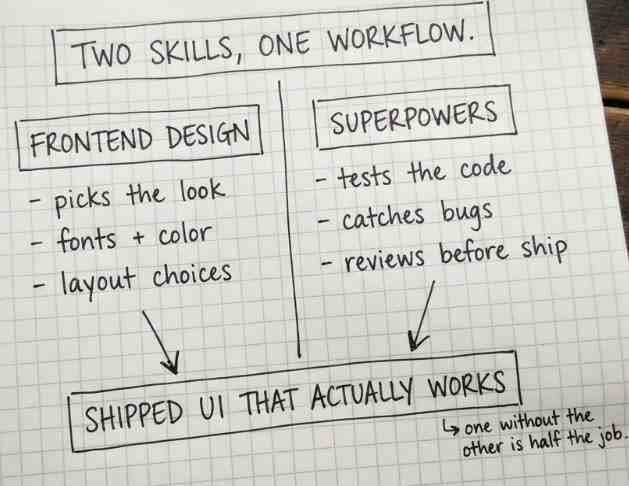
- You can use both together. One makes your UI look good, the other makes sure the code actually works properly.
- Install commands keep changing as Claude Code updates through 2026, so this guide includes a safe fallback command too, not just one fixed command.
I've used Claude Code a lot for building small websites and dashboards, and I noticed something early on. Without any extra help, Claude tends to make everything look the same — the same purple-to-blue gradient, the same rounded cards, the same "Inter" font everywhere. It's not bad, it's just boring, and it looks obviously AI-made.
That's exactly the problem "Claude frontend skills" are built to fix. This guide explains what these skills actually are, how the official one from Anthropic works, how the popular community one called Superpowers fits in, and how to install both step by step. It also answers the exact questions people are searching around this topic — GitHub links, install steps, React support, and even the PPT/slides question.
Let's start from the very beginning.
What Are Claude Frontend Skills?
Claude frontend skills are structured instruction sets, usually a single file called SKILL.md plus some supporting files, that Claude Code reads before it starts building a website or app screen. Think of it like handing Claude a proper design brief before it touches any code, instead of letting it just guess what "looks nice" means.
Without any skill, Claude relies purely on patterns it learned during training, and those patterns tend to repeat the same safe, generic choices. With a frontend skill turned on, Claude is pushed to do things differently, such as:
- Pick one clear style first — brutalist, minimal, retro, playful, luxury — before writing a single line of code.
- Avoid overused defaults, like the Inter font and purple gradients seen on almost every AI-made site.
- Plan fonts, colors, and layout on purpose, not just grab whatever comes to mind first.
- Check its own design plan against what was actually asked for, and fix it if it still looks generic.
- Write clean CSS that doesn't have hidden conflicts that quietly break spacing or layout.
In simple words: a frontend skill is what turns Claude from "just writing code fast" into "thinking a bit like a real designer" before it starts typing.
The Official Frontend Design Skill from Anthropic
The main tool people mean when they search "Claude frontend skill" is Anthropic's own official plugin, simply called Frontend Design. This is the one built directly by Anthropic, not by an outside developer, and it's the safest starting point for beginners.
Once installed, no special command is needed to use it — it turns on by itself the moment Claude Code is asked to build something visual. For example, typing "Build a landing page for an AI security startup" or "Design a settings panel with dark mode support" quietly triggers the skill behind the scenes.
Here's what this skill actually covers, in plain words:
- Design styles: glassmorphism, brutalism, claymorphism, neumorphism, minimalism, bento-style grids, skeuomorphism, and dark mode.
- UI elements: buttons, modals, navigation bars, sidebars, cards, tables, forms, and charts.
- Frontend stacks: React, Next.js, Vue, Svelte, SwiftUI, React Native, Flutter, and plain HTML/CSS/JS with Tailwind.
What this actually means: whether building a simple landing page or a full app screen, this one skill is broad enough to help with almost any frontend job.
How to Install the Claude Frontend-Design Skill
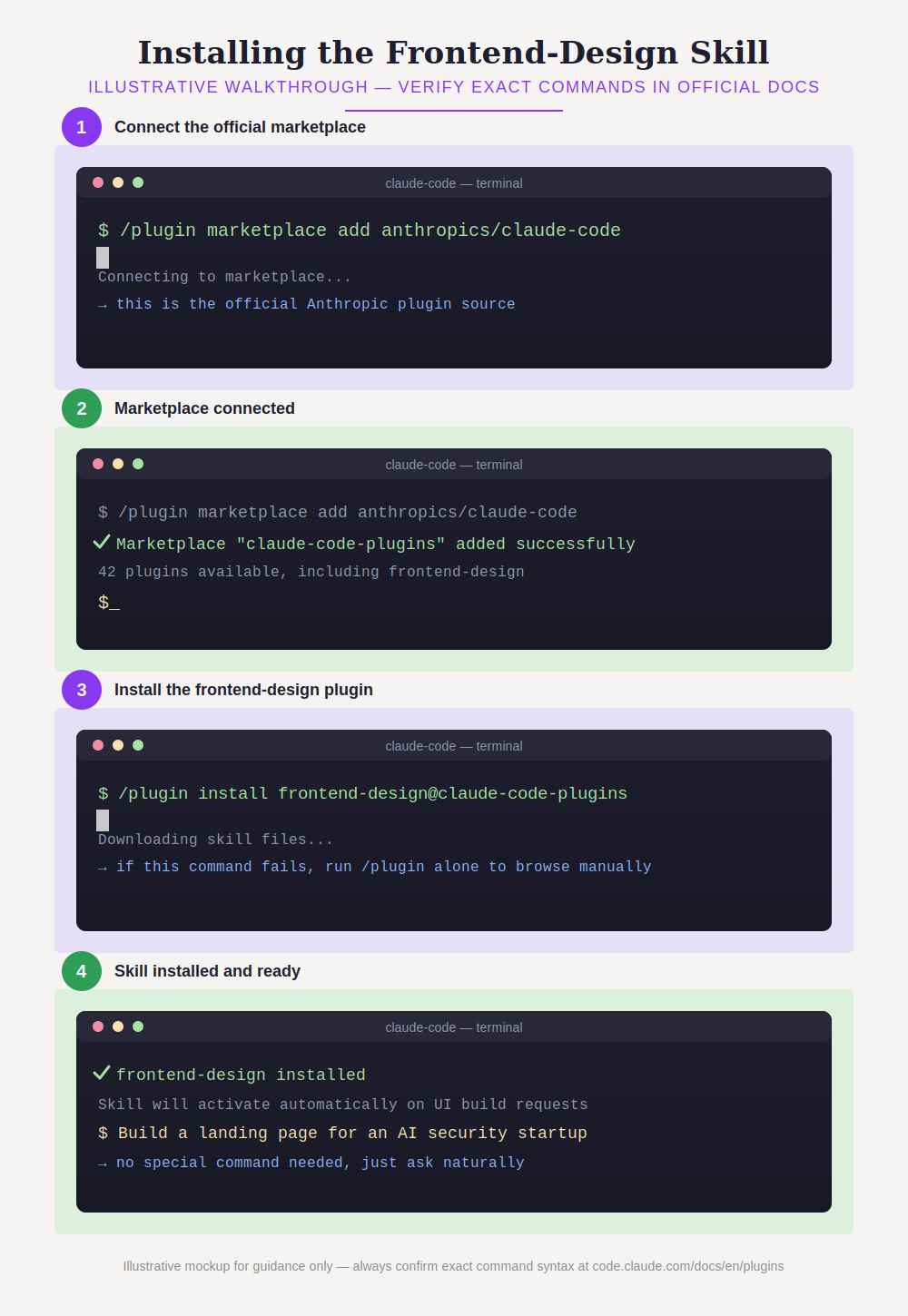
The Frontend Design skill is installed by adding Anthropic's official plugin marketplace inside Claude Code, then installing the plugin from it. Here are the commands as they stand right now:
/plugin marketplace add anthropics/claude-code
/plugin install frontend-design@claude-code-plugins
A genuine heads-up: plugin and marketplace names in Claude Code have changed a few times through 2026, so don't panic if that exact second line doesn't work. If it fails, type /plugin with nothing after it, and Claude Code will open an interactive menu to browse and install "frontend-design" by hand instead.
Step by step, here's how to install it for the first time:
- Open Claude Code in your terminal, not inside an editor extension.
- Run the marketplace command shown above to connect to Anthropic's plugin list.
- Run the install command to actually add the frontend-design skill.
- If either command fails, type /plugin alone and pick "Browse and install plugins" from the menu instead.
- Restart your Claude Code session if the skill doesn't show up right away.
- Test it by asking Claude to build something, like "Create a pricing page for a fitness app" — no special command should be needed for it to activate.
For the most current, official install steps, always check Claude Code's official plugin documentation directly (code.claude.com/docs/en/plugins), since command names can be updated after this article is published.
Where to Find Claude Frontend Skills on GitHub
Anthropic's official skills, including Frontend Design, are published on Anthropic's public GitHub, and this is also where most community-made skills like Superpowers live. A lot of people search "Claude frontend skills GitHub" because they want to actually read the SKILL.md file before trusting it, and that's a smart habit.
Here's what's genuinely worth checking before installing anything from GitHub:
- Who published it — an official Anthropic repository is always safer than a random personal one never heard of before.
- Read the SKILL.md file directly on GitHub before installing, to know exactly what instructions are being given to Claude.
- Check for any bundled scripts, since some community skills include extra automation, not just plain instructions.
- Look at recent activity — a skill repo that hasn't been touched in a year might be outdated for the current Claude Code version.
What Is the Superpowers Skills Framework?
Superpowers is a separate, community-built skill system for Claude Code, made by a developer named Jesse Vincent (known online as "obra"), and it's not about design at all — it's about how Claude works as a whole. A lot of people search for this right alongside Frontend Design, assuming they're the same thing, but they solve completely different problems.
Instead of being one single plugin, Superpowers is more like a full working method, made up of smaller skills that teach Claude things like:
- Brainstorming properly — asking clarifying questions before jumping straight into code.
- Test-driven development (TDD) — writing a failing test first, watching it fail, then writing just enough code to pass it.
- Systematic debugging — following a structured process to find the real cause of a bug instead of randomly guessing fixes.
- Subagent-based review — using separate review "agents" that double-check the work against the original plan.
- Skill authoring — letting Claude build and improve its own new skills over time.
Why this matters for frontend work specifically: Frontend Design can make Claude build something that looks genuinely good, but on its own, it won't stop Claude from skipping tests or quietly breaking something while editing CSS. Superpowers is what covers that gap — it's the discipline layer sitting on top of the design layer.
How to Install Superpowers
/plugin marketplace add obra/superpowers-marketplace
/plugin install superpowers@superpowers-marketplace
Once installed, restart Claude Code. From that point on, Superpowers adds a background instruction telling Claude to actively check if any of its skills apply to a task, not just when specifically asked for them.
Frontend Design vs Superpowers: What's the Difference?
Frontend Design focuses purely on how an interface looks, while Superpowers focuses on how Claude works through the entire coding process. Here's a direct side-by-side comparison.
| Frontend Design Skill | Superpowers | |
|---|---|---|
| Main focus | Visual design decisions and UI code | Overall development process and discipline |
| Built by | Anthropic (official) | Jesse Vincent / community (obra) |
| When it activates | UI or frontend build requests | Almost every coding task |
| What it fixes | Generic, "AI-looking" interfaces | Rushed, untested, or unreviewed code |
| Best used | Alone, for pure design tasks | Combined with a design skill for full projects |
The honest take: if only the site's look matters, Frontend Design alone is enough. But for anything real that's planned to actually ship, installing both is worth it — visual polish means very little if the underlying code breaks the moment someone clicks the wrong button.
Can Claude Frontend Skills Work with React?
Yes, the Frontend Design skill fully supports React, along with Next.js, Vue, Svelte, and several other frontend stacks. This is one of the most searched follow-up questions, so here's a specific answer instead of a vague one.
When Claude is asked to build something in React with the skill active, here's roughly what changes compared to asking without it:
- Component structure gets more thought, instead of one giant messy file with everything crammed in.
- Styling choices become intentional — a real color and spacing system instead of random Tailwind classes thrown together.
- Animations and transitions get added purposefully, rather than skipped entirely or overused everywhere.
A mistake many beginners make here is assuming the skill will automatically match an existing project's design system. It won't, unless told to — always mention an existing component library, color tokens, or design rules directly in the prompt for the best results.
Can Claude Frontend Skills Help Make Slides or a PPT?
Yes, but not through the Frontend Design skill directly — Claude Code's frontend design skills can be used to build HTML-based, web-style slide decks, which is different from generating a traditional .pptx PowerPoint file.
- Web-style slides: Claude can use frontend design principles to build a scrollable, browser-based slide deck using HTML/CSS/JS — this looks like a polished website that behaves like a presentation.
- Traditional .pptx file: for a downloadable PowerPoint file to open in Microsoft PowerPoint, that's a separate document-creation feature, not the frontend design skill itself.
So for a real PowerPoint file, ask Claude directly for a PowerPoint/.pptx presentation instead of a "frontend slide deck." But for a modern, animated, web-based presentation to share as a link, that's exactly where frontend design skills genuinely shine.
What Is a "Claude Frontend Agent"?
"Claude frontend agent" usually refers to Claude Code acting on its own, using the frontend-design skill plus its coding tools, to plan, build, and review a UI with less manual back-and-forth. It's not a separate product — it's really just Claude Code behaving in an "agentic" way, meaning it takes several steps on its own instead of waiting for instructions after every single action.
- Planning the design direction itself, based on the brief given.
- Writing the actual code files without needing every single line specified.
- Reviewing its own output against the original request before showing it to the user.
This term likely gets searched a lot because it sounds like a separate product, but it's really just describing how Claude Code plus a good skill already behaves once it's set up properly.
Best Practices for Using These Skills Well
- Give a real, specific brief. The more details provided about audience, purpose, and tone, the less Claude has to guess, and the less it falls back on generic patterns.
- Push back if it still looks templated. If Claude's first design plan feels boring or generic, say so directly — this pushback is actually built into how the skill is designed to work.
- Use both skills together for real projects. Let Frontend Design handle the look, and let Superpowers handle testing and review.
- Always check a skill's SKILL.md before installing, especially for anything not published directly by Anthropic.
- Call the skill manually if unsure it's active. Most design skills trigger automatically, but a command like /frontend-design can also be invoked directly to confirm.
- Expect install commands to change over time. If a command from any guide, including this one, stops working, run /plugin alone to browse what's actually available right now.
Common Mistakes I See People Make
- Installing Superpowers expecting design help. It genuinely won't make your UI prettier on its own — that's not what it's built for, and people are often disappointed when they realize this.
- Never checking if the skill is even active. Many people assume it's working just because they installed it once, without ever confirming with a direct test prompt.
- Skipping the brief and expecting magic. A common beginner mistake is typing "make me a nice website" with zero detail, then being surprised it still looks generic.
My Honest Opinion on Whether You Need This
To be straightforward: if you only build small personal projects occasionally, there's no need to overthink this — install Frontend Design, skip Superpowers for now, and see how it goes. It genuinely depends on how serious your project is.
But for anything planned to actually ship to real users, or client projects, installing both is worth the five extra minutes it takes. The design skill alone gets a good-looking first draft, but Superpowers is what stops small, sloppy code mistakes from turning into real bugs later.
Where people get it wrong, in experience, is expecting either skill to replace their own judgment completely. These skills guide Claude, they don't replace reviewing the final result — everything Claude builds should still be read through before shipping it anywhere real.
What to Do Next
If nothing's installed yet, start with just the Frontend Design skill and try it on one small project this week. Once comfortable with how it behaves, add Superpowers on top for anything planned to actually launch.
Whatever you choose, keep official documentation open in another tab while setting this up, since command names shift as Claude Code evolves.
Frequently Asked Questions
What is the Claude Code frontend design skill?+
It's Anthropic's official skill that guides Claude through deliberate design decisions — aesthetic direction, typography, color, and layout — before writing any UI code. This helps the output avoid the generic, repetitive look most AI-generated interfaces have.
What are Superpowers skills for Claude?+
Superpowers is a community-built skills framework, created by developer Jesse Vincent (obra), that gives Claude Code a structured development process. It covers brainstorming, test-driven development, systematic debugging, and subagent-based code review.
Do I need both the Frontend Design skill and Superpowers?+
No, both work independently and can be used alone. But since they solve different problems — one improves visuals, the other improves process — many developers genuinely run both together for real projects.
Is the Frontend Design skill free to use?+
Yes, it's an official, freely installable plugin from Anthropic's public plugin marketplace and GitHub repository. There's no separate cost beyond normal Claude Code usage.
How do I know if a skill is actually active in my session?+
Skills built for automatic activation, like Frontend Design, trigger based on the context of the request. If unsure, it can also be invoked directly with a slash command like /frontend-design to confirm it's running.
Where can I find Claude frontend skills on GitHub?+
Anthropic's official skills, including Frontend Design, are published on Anthropic's public GitHub account. Community skills like Superpowers are hosted separately by their individual creators, so always check who published a repository before installing it.
Can I use Claude frontend skills with React specifically?+
Yes, React is one of the main frontend stacks the Frontend Design skill actively supports, along with Next.js, Vue, and Svelte. For the best results, mention any existing component library or design system directly in the prompt.