Google Assistant Dark Theme: What Happened to It, and How Dark Mode Actually Works Now
Before anything else, a fact that changes how you should read the rest of this guide: Google completed its transition from Google Assistant to Gemini on most Android phones in March 2026, retiring Assistant as the default digital helper on the majority of Android devices. If you're specifically searching for how to enable a dark theme inside the Google Assistant app or interface, there's a good chance the assistant you're actually looking at on your phone right now is Gemini, not Assistant — and the two handle dark mode differently.
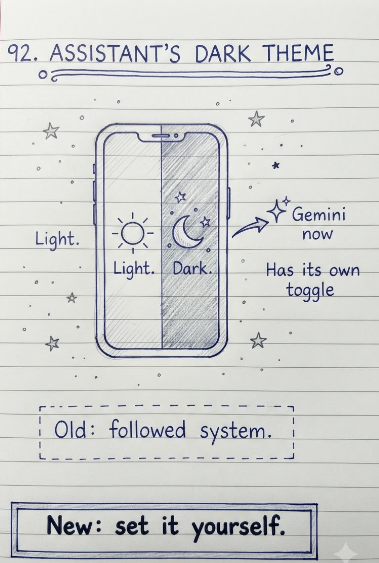
This guide covers both sides of that honestly: how Google Assistant's appearance and dark theme behavior actually worked, where Assistant still survives on certain devices, and — most usefully for most readers today — exactly how to turn on dark mode for Gemini, which now includes something Assistant never really had: its own dedicated, in-app dark theme toggle.
How Google Assistant's Dark Theme Actually Worked
Google Assistant, historically, didn't have a standalone dark mode switch you could flip inside the Assistant app itself. Instead, its visual appearance — including whether its interface displayed with a dark or light background — was tied directly to your device's overall system theme setting. If your phone's system-wide display was set to dark theme, Assistant would generally appear in dark mode automatically; if your device was set to light theme, Assistant would follow suit.
- On Android, this meant going to Settings, then Display, and toggling Dark theme at the system level — Assistant's appearance would update to match, without any separate setting inside Assistant itself.
- There was no dedicated 'dark theme' menu item inside the classic Google Assistant settings, which is part of why searches for it often led to confusion or outdated screenshots.
- Assistant's behavior here was consistent with how many built-in Android system apps handled theming at the time — inheriting the device-wide setting rather than offering independent control.
Where Google Assistant Still Exists in 2026
Assistant hasn't disappeared entirely — the March 2026 transition specifically targeted most Android phones. Assistant continues to operate, at least for now, in several other places, generally with the same system-theme-following appearance described above:
- Older Android devices that haven't yet received the Gemini transition update
- Certain smart home and Nest devices, including some smart displays and speakers, though Google has been actively retiring specific Assistant features on these devices as part of the broader Gemini rollout
- Some non-Android platforms and regions where the migration to Gemini hasn't been completed
- Devices where a user has manually kept Assistant selected as their default digital assistant app, where that option remains available
How to Enable Dark Theme on Gemini (Assistant's Replacement)
This is the part most people searching for 'Google Assistant dark theme' actually need today. Unlike Assistant, Gemini includes its own dedicated dark theme toggle, separate from your device's overall system theme setting — meaning you can set Gemini to dark mode independently, even if the rest of your phone is set to light mode, or vice versa.
On Android (Mobile App)
- Open the Gemini app, or go to gemini.google.com in your mobile browser, and make sure you're signed in.
- Tap the Menu icon, then go to Settings & help.
- Find the Dark theme option and toggle it on or off directly.
- Your preference is saved for future sessions on that same browser and device.
On Computer (Web)
- Go to gemini.google.com in your desktop browser and sign in.
- Click Settings & help, typically found at the bottom of the side menu.
- Toggle Dark theme on or off from the settings panel.
By default, Gemini's mobile app color scheme still matches your device's overall system theme, similar to how Assistant used to behave — but the explicit in-app toggle means you're no longer required to change your entire phone's system-wide theme just to get a dark interface for your AI assistant specifically.
Conclusion
If you came looking for Google Assistant's dark theme setting expecting to find a dedicated toggle, the honest answer is that it never really had one — its appearance simply followed your device's system-wide theme. And given that Google completed its shift from Assistant to Gemini on most Android phones in March 2026, there's a good chance the assistant on your device today is Gemini rather than the classic Assistant you might remember, which is genuinely good news here: Gemini offers exactly the standalone dark mode control that Assistant never did.
If Assistant is still active on your specific device (an older phone, a smart display, or another platform not yet migrated), your only real lever remains your device's overall system dark theme setting. If you're on Gemini, head straight to its own Settings & help menu and toggle Dark theme directly — no system-wide changes required.
FAQ
Frequently Asked Questions
Does Google Assistant have a dark theme setting?+
Google Assistant never had its own dedicated, standalone dark theme toggle. Its appearance followed your device's overall system-wide dark or light theme setting — if your phone's display was set to dark theme, Assistant's interface would generally match automatically.
Is Google Assistant still available in 2026?+
Google completed its transition from Assistant to Gemini on most Android phones in March 2026, retiring Assistant as the default on those devices. Assistant still functions on some older devices, certain smart home and Nest products, and some platforms or regions not yet migrated to Gemini.
How do I turn on dark mode for Gemini?+
On mobile, open the Gemini app or go to gemini.google.com, tap the Menu icon, go to Settings & help, and toggle Dark theme on. On desktop, go to gemini.google.com, click Settings & help, and toggle Dark theme from there. This is a dedicated setting independent of your device's system theme.
Why can't I find a dark theme option in Google Assistant?+
Because Assistant was never built with its own separate dark theme toggle — its appearance was tied to your device's system-wide theme setting rather than an in-app switch. If you're looking at Gemini instead of classic Assistant, which is likely on most Android phones post-March 2026, you'll find a genuine dedicated dark theme toggle in its Settings & help menu.
What replaced Google Assistant?+
Gemini has replaced Google Assistant as the default digital assistant on most Android phones, following Google's completed transition in March 2026. Gemini took over core assistant functionality while also adding capabilities Assistant didn't have, including a dedicated dark theme toggle independent of the device's system theme.
Can I still use Google Assistant instead of Gemini?+
On devices where Assistant hasn't been fully retired, it may still be selectable as your default digital assistant app through your device's settings, depending on your specific device, Android version, and region. On phones that have completed the March 2026 transition, Assistant is generally no longer available as the default option.
Does changing my phone's system dark theme affect Gemini?+
By default, Gemini's mobile app color scheme matches your device's overall system theme, similar to how Assistant used to behave. However, Gemini also offers its own independent dark theme toggle inside its Settings & help menu, so you can override the system-matching default and set Gemini's theme separately if you prefer.
Which Google Assistant features have been removed as part of the Gemini transition?+
Reported removals on some devices have included Interpreter mode's live translation on Nest devices, Family Bell scheduled announcements, voice-based birthday reminder notifications, voice-based photo favoriting and sharing, and daily automated Assistant updates like scheduled weather briefings — with functionality generally shifting toward Gemini instead.
Does Google Assistant on smart displays and speakers have dark theme?+
Smart displays generally don't offer a separate light/dark theme toggle in the same way phone apps do, since their interface design is built around the device's ambient display and screensaver behavior rather than a standard app theme setting. If you're looking for dark-mode-style control on a smart display, check that specific device's display and ambient settings rather than looking for an Assistant-specific theme toggle.
Is Gemini's dark theme the same as Assistant's dark theme used to be?+
No, and this is a meaningful improvement. Assistant's dark appearance was entirely dependent on your device's system-wide theme setting, with no independent control. Gemini includes its own dedicated dark theme toggle in its Settings & help menu, letting you set Gemini's appearance independently of your device's overall system theme if you choose to.