How to Develop Programming Skills: The Complete 2026 Guide (Roadmap, Practice Methods, Common Mistakes & How to Stay Consistent)
You develop programming skills by writing code daily, debugging your own mistakes without immediately searching for the answer, and building small original projects instead of only following tutorials — active production, not passive consumption, is what builds the skill.
In practical implementation, most beginners get this backward. They mistake the comfortable feeling of following a video tutorial for actual skill-building, and end up in what developers call 'tutorial hell' — able to code along with someone else's project, but unable to open a blank file and build something of their own. This guide breaks down what genuinely builds skill, a realistic roadmap with actual code-level checkpoints, common mistakes that quietly stall progress, and how to structure consistent practice without burning out.
Why Tutorials Alone Don't Build Programming Skill
When working through this, it helps to understand the underlying memory mechanism. Watching a tutorial activates recognition memory — you see a solution and it makes sense in the moment. Writing original code activates recall memory — you have to generate the syntax and logic yourself, with no prompt in front of you. These are different cognitive processes, and only the second one is what interviewers, real projects, and production bugs actually test.
A Small Experiment You Can Run on Yourself
Pick any tutorial project you finished in the last month. Close the tutorial, delete your old code, and try to rebuild it from a blank file using only official documentation. If you get stuck within the first ten minutes, that gap — not the number of tutorials you've completed — is your actual current skill level. Most beginners are surprised by how large this gap is the first time they test it.
| Activity | What It Actually Builds | Where It Falls Short |
|---|---|---|
| Watching video tutorials | Familiarity with syntax and general concepts | Recognition, not recall — doesn't transfer to a blank file |
| Typing tutorial code along | Slightly better retention plus muscle memory for syntax | Still low-friction; you're transcribing, not generating |
| Structured coding exercises | Syntax fluency, debugging reps, pattern recognition | Problems are pre-scoped; real problems rarely are |
| Building original projects | Problem decomposition, architecture decisions, independent debugging | Slower and more frustrating early on — but highest-leverage |
| Reading others' code | Real-world patterns, codebase navigation | Most valuable after you already have some independent building reps |
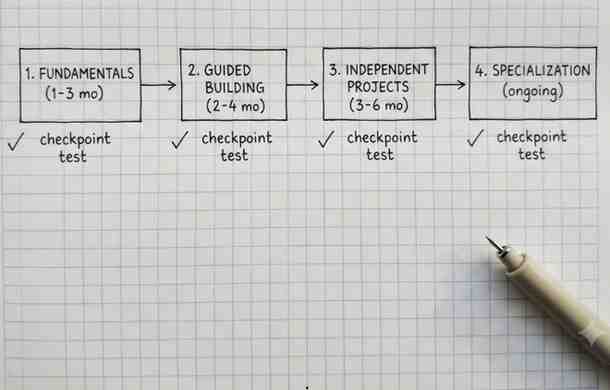
A Realistic Roadmap: Beginner to Job-Ready
| Stage | Duration | Focus | Checkpoint Test |
|---|---|---|---|
| 1. Fundamentals | 1–3 months | One language's syntax, control flow, functions, basic data structures | Write a small program (calculator, guessing game) from a blank file, no reference open |
| 2. Guided Building | 2–4 months | Project-based courses, typed by hand, never copy-pasted | Rebuild a completed guided project from memory a week later |
| 3. Independent Projects | 3–6 months | Self-chosen projects, no tutorial, docs and forums only | Ship a working v1 of an idea you scoped yourself |
| 4. Specialization & Collaboration | Ongoing | A chosen domain, version control on a team, open-source contribution | Read unfamiliar code, submit a pull request, take part in code review |
Practice Methods With Real Evidence Behind Them
The 'Build It Twice' Method
Follow a project tutorial once for exposure. Then close it completely, delete the code, and rebuild the same project from a blank file — filling gaps with documentation, not the original video. This single habit closes the recognition-versus-recall gap faster than almost anything else.
Timed, Independent Debugging
A common mistake to avoid is searching for the exact error message the second something breaks. Give yourself a genuine 20–30 minutes of independent investigation first — read the full error message and stack trace, isolate the failing line, and check the actual state of your variables before you check anything else. In practical implementation, this looks like a simple three-step loop:
A Minimal Debugging Example
Here's the kind of hands-on habit most tutorials skip: using targeted logging instead of guessing. Given a Python function that's silently returning the wrong value:
Adding one print statement per step, then removing it once the bug is found, is a small habit — but it's the difference between debugging methodically and debugging by trial and error, which is one of the fastest ways to build real independent-problem-solving skill.
Project Ideas by Skill Level
| Level | Example Projects | What They Force You to Practice |
|---|---|---|
| Beginner | To-do list, unit converter, number-guessing game | Core syntax, control flow, input/output handling |
| Intermediate | Expense tracker with saved data, basic REST API, CLI quiz app | Files or databases, external libraries, multi-file structure |
| Advanced | Full-stack app with auth, real-time chat, a project consuming a public API | Integrating systems, edge-case handling, architecture decisions |
| Portfolio-ready | A project solving a real problem you personally have, deployed publicly | End-to-end ownership: plan, build, debug, deploy, document |
Common Mistakes That Quietly Stall Progress
- Course-hopping the moment things get hard, which resets progress instead of pushing through the exact friction where learning happens
- Copy-pasting from AI tools or forums without understanding the code, which produces working output short-term but builds no lasting skill
- Skipping fundamentals to jump into frameworks, then debugging framework errors without the underlying language knowledge to understand them
- Never finishing projects — abandoning them once the interesting part is done, and skipping the debugging and polish that make up most real development work
- Learning in isolation for too long with no code review, which lets bad habits calcify unnoticed
Building a Consistent Practice Habit
- Favor frequency over duration: 30–45 focused minutes most days beats one long weekend session, since skill retention depends on short-term continuity between sessions
- Keep a running list of small project ideas so decision fatigue never becomes the reason a session gets skipped
- Track what you actually built, not hours logged in a course platform, as your real progress signal
- Join a community or study group for feedback — isolated practice plateaus faster than practice with any accountability
- Pace yourself: a sustainable, moderate schedule over many months consistently outperforms intense bursts followed by long breaks
Conclusion
The language or course you pick matters far less than how much of your time goes into active production versus passive consumption. Run the roadmap above, use the checkpoint tests to know if you're actually ready to move on, and treat getting stuck as the mechanism of learning rather than a sign something's wrong. Pick one project idea today, close every tutorial tab, and build it.
FAQ
Frequently Asked Questions
How long does it take to develop solid programming skills?+
It depends heavily on how much of your practice is active versus passive, but a realistic path from complete beginner to independently building moderately complex projects typically takes 6 months to a year of consistent, mostly-active practice.
Is it better to learn one programming language deeply or several at once?+
One language deeply first is more effective — core debugging habits and problem-solving logic transfer across languages, while spreading attention early on often means never getting past basic syntax in any single one.
How much should I rely on AI coding tools while learning?+
Attempt the problem yourself first and use AI tools mainly to check or explain your own attempt, not to generate a solution you haven't tried — relying on AI to skip the attempt short-circuits the struggle that actually builds skill.
What's the single most effective way to get better at programming?+
Building original projects without a tutorial, then debugging the resulting problems mostly on your own using documentation and targeted searches — it forces the same decomposition and independent debugging skills that real programming work requires.