Information Technology Skills: In-Demand Skills, Certifications, Resume List & How to Build Them
Information technology skills are the technical tools you use—like computer networks, cloud storage, and basic coding—paired with people skills like clear communication during a computer crash. If you are trying to break into tech or move up to cloud engineering without getting overwhelmed, you are in the right place. Hiring managers today care much more about what you can actually do with your hands than what your degree says. Let's walk through what employers want right now, how to start from scratch, and how to put it all on your resume.
What Counts as an IT Skill: Hard Skills vs. Soft Skills
To succeed in IT, you need a mix of technical know-how and strong communication. If you only know how to code but cannot explain a problem to your team, your career will stall.
Technical (Hard) Skills in IT
Hard skills are the specific, testable technical tasks you do every day. These include setting up computer networks, running operating systems, writing simple Python scripts, and managing cloud servers. These are the exact skills that technical interviews test you on.
IT Soft Skills That Employers Actually Screen For
Soft skills are just as important as technical skills because computers do not run in a vacuum. Key workplace behaviors include:
- Clear Explanation: Telling a non-tech coworker why the internet is down without using confusing jargon.
- Staying Calm Under Pressure: Keeping a clear head when a server crashes instead of panicking.
- Good Notes: Writing down clear steps when fixing a bug so your teammates know what you did.
The Most In-Demand IT Skills
Industry hiring reports show that companies are spending money on cloud systems, security, and automation. Here are the core areas employers look for:
| Skill Category | Why Companies Need It | Where to Start |
|---|---|---|
| Cloud Computing (AWS, Azure) | Companies are moving away from physical office servers to flexible online cloud networks. | Basic cloud certifications (like AWS Cloud Practitioner) and free sandbox labs |
| Cybersecurity | Protecting company data and stopping online threats is a top priority for every business. | CompTIA Security+ and basic network security practice |
| Automation & DevOps | Teams want software updates to happen automatically and quickly without manual errors. | Git version control and Docker basics |
| AI Tools & Integration | Businesses are using AI helpers and smart APIs to speed up daily work. | Learning Python basics and how to use modern APIs |
| Data & Analytics | Companies have massive amounts of data and need people to clean it up and make sense of it. | SQL practice and data visualization tools like Power BI |
| Computer Networking | Everything in cloud computing and security relies on understanding how computers talk to each other. | CompTIA Network+ or CCNA study materials |
Entry-Level IT Skills for Beginners (Help Desk & IT Support)
Help desk and tech support jobs are the easiest doors into the tech industry. You do not need to be a genius; you just need to understand basic troubleshooting.
- Operating System Fixes: Troubleshooting Windows, macOS, and basic Linux error screens.
- Hardware Checkups: Swapping out a broken laptop keyboard or fixing a power supply.
- Network Checks: Figuring out if a dropped Wi-Fi signal is caused by a bad router or a computer setting.
- Support Tickets: Logging and tracking customer problems in tools like Jira or ServiceNow.
- Remote Help: Using screen-sharing software safely to fix a user's computer from another room.
IT Certifications That Build These Skills
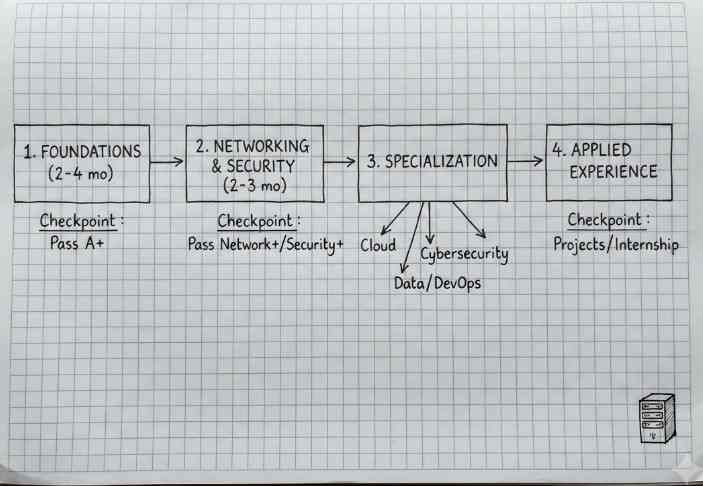
Certifications prove to employers that you actually know your stuff. The classic path for beginners follows a clear order:
[ CompTIA A+ ] ──► [ CompTIA Network+ ] ──► [ CompTIA Security+ ] ──► [ Cloud / Specialization ]
- CompTIA A+: Covers basic hardware, operating systems, and troubleshooting. Perfect for help desk jobs.
- CompTIA Network+: Teaches IP addresses, routers, and how data moves across a network.
- CompTIA Security+: Teaches basic safety rules, passwords, and security frameworks.
- Cloud Certifications: Proves you know how to build and manage virtual servers in AWS, Google Cloud, or Azure.
A Practical Roadmap to Build IT Skills From Scratch
If you are starting with zero experience, take it step-by-step. Do not just watch videos—open up a terminal or a virtual machine and practice.
| Phase | Time | What to Focus On | Goal |
|---|---|---|---|
| 1. Basics | 2 to 4 months | Operating systems, hardware basics, and command line tools | Pass CompTIA A+ |
| 2. Networking | 2 to 3 months | IP addresses, switches, and basic firewalls | Pass CompTIA Network+ & Security+ |
| 3. Choose a Track | 3 to 6 months | Pick one path: Cloud, Security, or Automation | Deploy a small project to the cloud |
| 4. Build a Portfolio | Ongoing | Document your projects and practice fixing simulated problems | Solve tech bugs on your own |
How to List IT Skills on a Resume
Automated hiring software scans your resume for exact keywords before a human ever reads it. Keep your layout clean and clear.
- Separate Hard and Soft Skills: Put your technical tools in one block and your communication skills in another.
- Be Specific: Instead of writing 'Cloud Experience', write exact tools like 'AWS (EC2, S3)' or 'Docker'.
- Show Results: Use numbers where you can. For example: 'Resolved 40+ help desk tickets a week with a 95% satisfaction score.'
- Match the Job Ad: Look at the skills requested in the job listing and include them if you know them.
- Clean Out Old Tech: Remove outdated programs so your resume stays fresh.
Common Mistakes When Building IT Skills
- Trying to Learn Everything at Once: Trying to study AI, blockchain, and cloud all on day one will burn you out. Master the basics first.
- Memorizing Without Labs: Passing tests using flashcards without ever opening a computer terminal leaves you helpless when a real error pops up.
- Ignoring Git: Learn version control early. Every tech job requires working with Git.
- Forgetting People Skills: Thinking technical skills are all you need will hold back your promotions.
Conclusion
Building a career in IT takes a mix of technical knowledge and clear problem-solving. Start with the basics like computer networks and operating systems, practice in a home lab, and get certified. Take it one step at a time, focus on hands-on practice, and you will be ready for the job market.
Frequently Asked Questions
What are the most in-demand IT skills?+
Cloud computing (AWS and Azure), cybersecurity, DevOps automation, and basic Python or SQL scripting lead current hiring demand.
How do I start a career in IT with zero experience?+
Start by studying for the CompTIA A+ certification, practice fixing common computer problems in a virtual lab, and apply for entry-level help desk jobs.
Do I need a computer science degree to work in IT?+
No. Many hiring managers care more about hands-on projects, practical problem-solving skills, and industry certifications than a college degree.
What is the best way to practice IT skills without a job?+
Use free cloud tiers, set up virtual machines on your computer, build a home lab network, and document your projects on GitHub.