Software Testing Basics: The Complete 2026 Guide for Beginners
Every piece of software you've ever used — the app you check first thing in the morning, the site you use to pay a bill, the game you play to unwind — went through some form of testing before it reached you. Software testing is the process of evaluating a software application to find defects, verify it behaves the way it's supposed to, and confirm it's actually ready for the people who'll use it. It sounds simple stated that way, but it's a genuinely deep discipline with its own vocabulary, techniques, and career path, and it's one of the few areas of software engineering that's expanding rather than shrinking as AI reshapes how code gets written.
That last point matters more than it might seem. As AI tools generate a growing share of production code, someone — or something — still has to verify that code actually does what it's supposed to do, safely and reliably. Understanding testing fundamentals is what lets you evaluate that verification intelligently, whether you're the one writing tests by hand or reviewing what an AI tool generated for you.
This guide covers the foundational concepts every beginner needs: what software testing is and why it exists, the core levels and types of testing, manual versus automated testing, how a bug moves through its life cycle, common testing methodologies, the tools you'll actually encounter on the job, and how the discipline is genuinely changing in 2026 without losing its fundamentals.
What Software Testing Actually Is
Software testing is the process of executing a software application or system with the intent of finding defects, verifying that it meets specified requirements, and confirming it behaves correctly under both expected and unexpected conditions. It's distinct from software development itself — a developer's job is to build the feature; a tester's job is to try, deliberately and systematically, to break it, misuse it, or find where it doesn't match what was actually required.
The core reason testing exists is straightforward: software is complex, built by fallible humans (and increasingly, by AI tools trained on human-written code), and even small defects can have outsized consequences — a miscalculated total on an e-commerce checkout page, a security gap in a login form, a crash that loses a user's work. Testing exists to catch those problems before they reach real users, when they're cheaper and safer to fix.
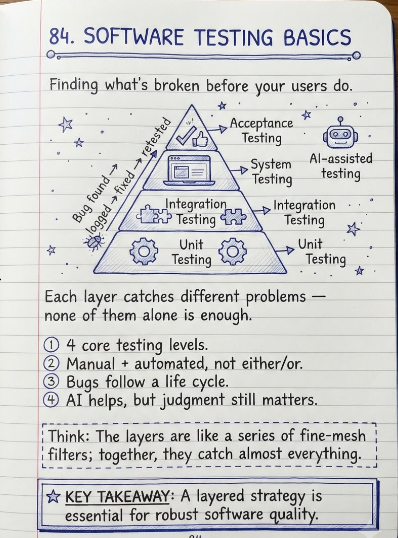
The 4 Core Levels of Software Testing
Testing isn't a single activity performed once at the end of development — it happens in layers, each checking a different scope of the system, from the smallest building block up to the finished product.
| Level | What It Checks | Who Typically Performs It |
|---|---|---|
| Unit Testing | The smallest testable pieces of code (a single function or method) in isolation, verifying each does exactly what it's supposed to | Developers, usually as they write the code |
| Integration Testing | Whether multiple units or components work correctly together once combined — for example, whether a payment module correctly talks to an inventory module | Developers or dedicated QA engineers |
| System Testing | The complete, fully integrated application, tested end-to-end against the full set of requirements | Dedicated QA/testing teams |
| Acceptance Testing | Whether the finished system actually meets business needs and is ready for release, often performed by or with real end users or stakeholders | QA teams, business stakeholders, or end users (User Acceptance Testing / UAT) |
Each level catches different kinds of problems. A bug that slips past unit testing (say, a function that fails on unusual input) might get caught at integration testing when it interacts with another component. A bug that passes both of those might still surface at acceptance testing if the finished feature technically works but doesn't actually solve the user's real problem — which is exactly why all four levels matter, rather than treating any single level as sufficient on its own.
Functional vs. Non-Functional Testing
Beyond the four levels, testing is also categorized by what aspect of the software it's actually evaluating.
- Functional testing verifies what the system does — does clicking 'Submit' actually save the form? Does the search bar return the correct results? This is testing against the specific, stated requirements of the feature.
- Non-functional testing verifies how well the system does it — performance testing (does it stay fast under heavy load?), security testing (can it be exploited?), usability testing (is it actually easy to use?), and compatibility testing (does it work across different browsers, devices, and operating systems?) all fall into this category.
- Regression testing re-runs previously passing tests after a code change, to confirm the change didn't accidentally break something that used to work — one of the most common and most automated forms of testing in active development.
- Smoke testing (sometimes called a 'build verification test') is a quick, shallow pass across the most critical functionality, run right after a new build to confirm it's stable enough to bother testing further, before investing time in deeper testing.
Black Box, White Box, and Gray Box Testing
This is a separate axis from the levels and types above — it describes how much internal knowledge of the code the tester has access to while designing their tests.
| Approach | What the Tester Knows | Typical Use Case |
|---|---|---|
| Black Box Testing | No knowledge of internal code — testing is based purely on inputs and expected outputs, from the user's perspective | System testing, acceptance testing, most manual QA testing |
| White Box Testing | Full access to and understanding of the internal code structure and logic | Unit testing, code coverage analysis, security testing of internal logic |
| Gray Box Testing | Partial knowledge of internal structure, combined with an external, user-facing testing approach | Integration testing, some security and penetration testing |
Manual Testing vs. Automated Testing
This is one of the first practical decisions any testing team has to make for a given feature or project, and the honest answer is almost always 'both, in different proportions,' rather than picking one exclusively.
- Manual testing: a human tester directly interacts with the application, executing test cases by hand without automation scripts. It's essential for exploratory testing, usability evaluation, and catching the kind of subtle, unexpected issues that a scripted test wouldn't think to check for — automated tests can only find what they were explicitly written to look for.
- Automated testing: pre-written scripts execute test cases automatically, without a human repeating the same steps by hand each time. It's ideal for repetitive tasks like regression testing, where the same checks need to run every time new code is committed, often dozens or hundreds of times a day in active development.
- The current industry balance: teams today automate an average of 57% of their tests, according to recent industry data, while still relying on manual testing for exploratory work, usability checks, and the kind of judgment-based evaluation automation can't replace.
The Bug Life Cycle: How a Defect Actually Gets Resolved
When a tester finds a defect, it doesn't just get fixed instantly — it moves through a structured process, commonly called the bug (or defect) life cycle, that most professional QA teams follow in some form.
- New: A tester finds and logs a defect, typically in a bug-tracking tool, including steps to reproduce it, expected vs. actual behavior, and severity.
- Assigned: The bug is reviewed and assigned to a specific developer or team responsible for that part of the codebase.
- Open / In Progress: The developer investigates and works on a fix.
- Fixed: The developer completes the fix and marks the bug as resolved, typically submitting it for a new build or deployment.
- Retest: A tester verifies the fix actually resolves the original issue, using the same reproduction steps that originally triggered it.
- Closed / Verified: If the retest confirms the fix works and doesn't introduce new problems, the bug is formally closed. If the issue persists, it's reopened and sent back to the developer instead.
Understanding this cycle matters even as a beginner, because writing a clear, reproducible bug report at the 'New' stage is one of the most immediately useful skills a new tester can develop — a vague bug report ('the app is broken') slows the entire cycle down, while a precise one (exact steps, expected vs. actual result, screenshots or logs) speeds it up significantly.
Common Testing Methodologies
- Waterfall testing: testing happens as a distinct, later phase after development is fully complete — a traditional, sequential approach that's become less common in modern software teams but is still used in some regulated or highly structured industries.
- Agile testing: testing happens continuously, in parallel with development, across short iterative cycles (sprints) rather than as a single late-stage phase — the dominant approach in most modern software teams today.
- Shift-left testing: a philosophy of moving testing as early as possible in the development process — testing requirements and design before code is even written, rather than waiting until a feature is 'done' to start testing it. This approach has become increasingly central to how teams reduce the cost of fixing defects, since problems caught early are dramatically cheaper to fix than problems caught after release.
- DevOps and continuous testing: testing integrated directly into CI/CD (continuous integration/continuous delivery) pipelines, so automated tests run automatically every time code is committed, rather than being a separate manual step before release. A large majority of DevOps teams now run automated tests as a standard part of their CI/CD pipeline.
Essential Tools You'll Encounter
| Category | Common Tools | What They're Used For |
|---|---|---|
| Test automation / browser testing | Selenium, Playwright, Cypress | Automating functional and regression tests for web applications |
| API testing | Postman, REST Assured | Testing backend APIs directly, independent of the user interface |
| Bug/defect tracking | Jira, Bugzilla, Azure DevOps | Logging, assigning, and tracking defects through the bug life cycle |
| Performance testing | JMeter, LoadRunner, k6 | Simulating heavy usage to test how an application performs under load |
| CI/CD integration | Jenkins, GitHub Actions, GitLab CI | Running automated test suites automatically as part of the build and deployment pipeline |
As a beginner, it's more valuable to understand what each category of tool is for and why it exists than to memorize every specific product — the specific tools in use at any given company will vary, but the underlying testing concepts they're built around stay consistent.
How AI Is Changing Software Testing in 2026
Software testing is going through a genuine structural shift as AI becomes deeply embedded in both how code is written and how it's tested. A few developments are worth understanding as part of the basics, even for someone just starting out.
- AI-generated test cases: AI tools can now generate test scenarios and test scripts from plain-language prompts or requirements documents, speeding up the initial creation of test suites, though human review of what those tests actually check remains essential.
- Self-healing automation: when a UI element changes (a button moves, an ID changes), self-healing automated tests can detect the change and update themselves automatically instead of simply failing — reducing broken-test maintenance by a meaningful margin when paired with a well-structured test framework.
- AI-generated code needs testing too: with a majority of production code now AI-generated or AI-assisted, testing has taken on an additional role — validating AI-written code specifically, since AI-generated code can introduce subtle logical errors that look syntactically correct but behave incorrectly.
- The gap between adoption and impact: despite near-universal AI adoption in testing tools, only a modest share of teams report that AI-driven testing has delivered clearly significant gains so far — a reminder that AI testing tools are still most effective when paired with solid testing fundamentals, not as a replacement for understanding what and why you're testing.
The practical takeaway for beginners: learning to use an AI testing tool is genuinely useful, but it doesn't substitute for understanding the fundamentals covered in this guide — test levels, test types, how to write a clear test case, and how to think critically about what could actually go wrong in a piece of software. AI tools are only as good as the judgment of the person directing and reviewing them.
How to Write a Basic Test Case
A test case is a documented set of conditions, steps, and expected results used to verify a specific piece of functionality. A clear, well-structured test case is one of the most fundamental skills in testing, regardless of which specific tools or methodology a team uses.
- Test case ID and title: a unique identifier and a short, clear description of exactly what's being tested.
- Preconditions: anything that needs to be true before the test starts (e.g., 'user must be logged in').
- Test steps: the exact, numbered sequence of actions to perform, written specifically enough that someone else could follow them without guessing.
- Expected result: precisely what should happen if the feature works correctly.
- Actual result: what actually happened when the test was executed — this is filled in during test execution, and compared directly against the expected result.
- Pass/Fail status: the final outcome, based on whether the actual result matched the expected result.
Conclusion
Software testing is built on a small set of durable fundamentals — testing at multiple levels, distinguishing functional from non-functional testing, balancing manual and automated approaches, and following a structured process from defect discovery to verified fix — that hold steady even as the tools and technology around them keep changing. The market context in 2026 makes this clearer than ever: testing is a genuinely growing, well-funded discipline, and AI is changing how tests get created and maintained without changing why testing matters in the first place.
If you're just starting out, the most useful place to focus isn't memorizing every tool or framework — it's building a solid grasp of the concepts in this guide: what each testing level actually catches, how to write a clear, reproducible test case and bug report, and how to think critically about where a piece of software is most likely to break. Every specific tool you'll use on the job builds directly on top of that foundation.
FAQ
Frequently Asked Questions
What is software testing in simple terms?+
Software testing is the process of checking whether a software application works correctly, meets its requirements, and is free of significant defects before it's released to users. It involves deliberately trying to find problems — incorrect behavior, crashes, security gaps, or usability issues — rather than simply confirming the software works as expected.
What are the main types of software testing?+
The four core testing levels are unit, integration, system, and acceptance testing, each checking a different scope of the application. Beyond that, testing is also categorized by what it evaluates — functional testing (what the system does) versus non-functional testing (performance, security, usability), plus specific types like regression testing and smoke testing.
What is the difference between manual and automated testing?+
Manual testing involves a human tester directly executing test steps by hand, which is essential for exploratory testing and usability evaluation. Automated testing uses pre-written scripts to execute tests without human repetition, which is ideal for repetitive tasks like regression testing. Most modern teams use a blend of both — current industry data shows teams automate an average of 57% of their tests while still relying on manual testing for judgment-based evaluation.
What is black box testing vs. white box testing?+
Black box testing evaluates software purely from the user's perspective, without knowledge of the internal code, based on inputs and expected outputs. White box testing is performed with full knowledge of the internal code structure and logic, commonly used for unit testing and code coverage analysis. Gray box testing sits in between, combining partial internal knowledge with an external testing approach.
What is the software testing life cycle?+
The Software Testing Life Cycle (STLC) is the structured sequence of phases a testing effort follows: requirement analysis, test planning, test case design, test environment setup, test execution, and test closure. It runs alongside the broader Software Development Life Cycle (SDLC), with testing activities increasingly happening in parallel with development rather than only at the end, especially in Agile and shift-left approaches.
Do I need to know how to code to become a software tester?+
Not necessarily for manual testing roles, which focus on exploratory testing, usability evaluation, and executing test cases by hand. However, coding skills are increasingly valuable and often required for automation testing roles, since writing and maintaining automated test scripts requires programming knowledge. Many testers build coding skills over time as they move from manual to automation-focused work.
What is regression testing and why does it matter?+
Regression testing re-runs previously passing test cases after a code change to confirm the change didn't accidentally break existing functionality. It matters because software is rarely static — new features and bug fixes are added continuously, and without regression testing, a fix in one area can silently break something else that used to work correctly.
Is AI replacing software testers?+
Current data suggests AI is changing how testing is done rather than eliminating the need for testers. AI tools can generate test cases and self-heal broken automated tests, but industry reports show only a modest share of teams see AI-driven testing delivering clearly significant gains so far, and human judgment remains essential for reviewing AI-generated tests, exploratory testing, and validating that AI-generated code itself behaves correctly.
What certifications are available for software testing?+
ISTQB (International Software Testing Qualifications Board) certification is one of the most widely recognized entry points internationally, covering testing fundamentals, test techniques, and test management at multiple certification levels. Beyond ISTQB, many testers also pursue tool-specific certifications (such as for Selenium or specific automation platforms) as they specialize further into automation or performance testing.
What's the difference between a bug and a defect?+
In practice, the terms are often used interchangeably to describe a flaw in software that causes it to behave incorrectly. Some teams draw a technical distinction — using 'defect' to describe a flaw found during testing (before release) and 'bug' to describe an issue found after release, in production — but this distinction varies by organization and isn't universally standardized.